FAQ & troubleshooting
Short answers to the things that trip people up. Still stuck? Contact us — or use in-app support, which attaches your app version automatically.
A balance didn't load, or the total turned red
A red total (or a “sync incomplete” state) means one source didn't answer this round — not that your money vanished. FolioSum keeps the last known balances instead of wiping them. Pull to refresh again in a minute. If one exchange keeps failing, re-check that its key is read-only, still valid, and has no IP restriction.
An exchange won't connect / keeps giving an error
Almost every failed exchange sync comes down to the API key itself, not the app. FolioSum only ever reads balances, so the fix is nearly always on the exchange's key settings. Work through these in order:
- Key & secret don't match. The API key and its secret are a pair created together — pasting a key from one and a secret from another (or from an old, deleted key) fails every time. Delete the connection in FolioSum, create a fresh key on the exchange, and copy both halves in one go. Watch for stray spaces or a truncated paste.
- “Read / view” permission isn't enabled. A brand-new key sometimes has no permissions ticked, or only trading. FolioSum needs the read-only / “view balances” (account information) permission. Enable it and refresh. Never enable trading or withdrawal — they aren't needed and aren't used.
- The key is IP-restricted. If you locked the key to a fixed IP (whitelist), it will reject your phone, whose IP changes constantly. Remove the IP restriction, or the key can't work from a mobile device.
- The key was revoked or expired. Some exchanges auto-expire unused keys, and reinstalling doesn't restore secrets. If a key stopped working, assume it's dead: delete it here and add a new one.
- Restored a backup from a different account. Exchange secrets are tied to the account that saved them. If you signed into a different account, or the key came from someone else's backup, it's dropped for safety — just re-enter that exchange's key.
- Wrong exchange or a passphrase is missing. Make sure the key belongs to the exchange you picked, and that exchanges needing a passphrase (OKX, Bitget, KuCoin, BitMart) have theirs entered exactly as set — a passphrase is separate from the secret.
Still failing after a fresh, read-only, unrestricted key? Send us the exchange name from in-app support and we'll look — some exchanges also block API access entirely in certain regions.
It connected before and now fails? The exchange may be blocking requests for a while. If you haven't changed the key, try again in 1–2 hours.
I added a Sui / Aptos / Starknet wallet and it shows nothing
Those three chains use 0x… addresses just like Ethereum, so the chain you pick matters. Make sure you selected SUI, APT or STRK in the chain chips — not ETH. In a bulk import file, the chain code must be the first token on the line, otherwise the address is treated as EVM.
My Aster account shows no balance
Aster returns no data at all while privacy mode is enabled on your account. Turn it off in Aster, then refresh. Aster needs no API key — only the wallet address you trade with.
Why aren't some exchanges supported?
FolioSum reads balances directly from your phone, so an exchange can only be supported when it offers a read-only balance API that works from a normal device. A few don't fit: some require every API key to be locked to a fixed IP address (a phone's IP changes constantly, so such a key would fail almost every time), and some simply have no public balance API. These are limits on the exchange's side, not something the app can work around. Missing one you use? Let us know — we add exchanges whenever a reliable read-only API exists.
Which chains does EVM token & DeFi coverage include?
70+ EVM-compatible chains: 0G, Abstract, ApeChain, Arbitrum, Arc, Avalanche, B2, Base, Berachain, Bitlayer, Blast, BNB Chain, BOB, Celo, Chiliz, Citrea, Conflux, CORE, Cronos, Cyber, DBK Chain, Ethereum, Etherlink, Flare, Fraxtal, Fuse, Gnosis Chain, Gravity, Hemi, HyperEVM, Immutable zkEVM, Ink, Kaia, Katana, Kava, KiteAI, Lens, Linea, Lisk, Manta Pacific, Mantle, MegaETH, Merlin, Metis, Mode, Monad, Morph, OP, opBNB, Plasma, Plume, Polygon, Robinhood, Ronin, Rootstock, Scroll, Sei, Soneium, Sonic, Sophon, Stable, Story Protocol, Taiko, Tempo, Unichain, WEMIX, World Chain, X Layer, XDC, ZetaChain, Zircuit, zkSync Era, Zora. New chains are added as DeBank supports them — missing one? Let us know.
My commodity has no price
Commodities other than precious metals need a TwelveData API key, and on TwelveData non-metal commodities (oil, gas, grains) are a paid add-on — a free key won't return them. Gold, silver, platinum and palladium are different: use the Precious metals asset type, which is priced free from Yahoo Finance and needs no key. Crude oil and Brent also have free presets under the Commodity type.
My Solana wallet is empty
Solana balances need a Helius API key (free tier is plenty). Add it under Settings → API Key — there's a “Get a free key” link next to the field.
Prices update slowly or stop for a while
Crypto prices come from CoinGecko's public API, which rate-limits heavy use. Adding a free CoinGecko Demo key raises the limit substantially. Stock and commodity prices come from Yahoo Finance and TwelveData.
Is FolioSum right for me?
FolioSum is for you if you want your whole portfolio — crypto wallets and exchanges, stocks, ETFs, precious metals and manual assets such as property or cash — in one place, without handing your data to a company. Everything stays on your device by default, there is no subscription and no ads. If you want it on a new phone or in the browser, you can turn on the optional cloud copy.
Can I see my portfolio on several devices or on the web?
Yes, if you sign in and turn on the optional cloud copy: your portfolio syncs across your devices, survives a reinstall or a new phone, and you can view and edit it at foliosum.app. Without the cloud copy everything stays on your phone only. The cloud copy is readable by your account (it is not end-to-end encrypted); exchange and brokerage keys are kept only in a block encrypted with your passphrase.
Does FolioSum connect to my exchanges and wallets automatically?
Yes. Exchanges connect through read-only API keys (32+ exchanges), and wallets only need a public address (26+ networks). FolioSum never needs withdrawal or trading access and never asks for a private key or seed phrase.
Does it track stocks, ETFs and gold, or is that all manual?
Prices for stocks, ETFs, precious metals and commodities update automatically; you only enter the quantity. Manual entries are for things without a market price, such as property, a car, cash or bonds. Brokerage import for stocks and options is available with optional prepaid credit.
Is it really free?
The core app is free: no subscription and no ads. Two optional data sources use prepaid credit that you buy only if you want them — DeFi positions with multi-chain EVM aggregation, and import from brokerages. Details are in the cost table in How it works.
What actually costs money?
Almost nothing. Manual entries, prices, all 32+ exchanges, native balances on 26+ chains, and ERC-20 tokens on 8 EVM chains (with your own free Alchemy key) are free. Only two optional things spend prepaid credit: DeFi positions and multi-chain aggregation across 70+ EVM chains, and brokerage connections such as Robinhood, Schwab or Fidelity. Credit is pay-as-you-go, not a subscription, and nothing spends it unless you turn it on. See the cost table in How it works.
I can't delete a wallet or exchange
Platforms whose balances were synced automatically are deleted together with those balances, after a confirmation. Deletion is only blocked when the platform still holds manual entries you typed yourself — those are irreplaceable, so remove them first.
I lost my backup passphrase
The passphrase only protects your exchange and brokerage API keys in the cloud copy (if you have none, you never need one). It never leaves your device and we cannot reset or recover it. Without it those keys can't be decrypted by anyone, including us — but your portfolio itself is not affected: just re-enter each exchange's key. Older backups made before this change are fully encrypted and do need the passphrase.
Are my API keys safe?
Exchange and brokerage keys are stored encrypted on your device. Exchange calls go straight from your phone to the exchange. If you turn on the optional cloud copy, your exchange and brokerage keys are uploaded only inside a block encrypted with your passphrase (we can't read it, and the web viewer never sees them). Create keys with read-only permission only: FolioSum can verify this for Binance and Bybit, but not for other exchanges, so check the permissions yourself — a key that can trade or withdraw could move your funds if it ever leaked. The same goes for brokerage keys and tokens (Alpaca, Tradier, Trading 212): FolioSum cannot check them, a provider may not offer read-only keys, and a key that is not read-only is entered at your own responsibility — if you are unsure, use SnapTrade instead. Never enter a private key or seed phrase anywhere in FolioSum; we accept no responsibility if you do.
What exactly is stored in the cloud, and can I delete it?
Only if you turn the Cloud copy on (the app asks once after sign-in; “Not now” keeps it off and deletes nothing). Then your portfolio data is kept in your account, readable by the account — it is not end-to-end encrypted — and your exchange and brokerage keys, if any, only inside a block encrypted with your passphrase. Turn the switch off on the Account screen and choose whether to delete the cloud data too, or use Delete my account there to remove everything, including your brokerage link and support tickets. Details: Privacy Policy.
What do the three refresh buttons do?
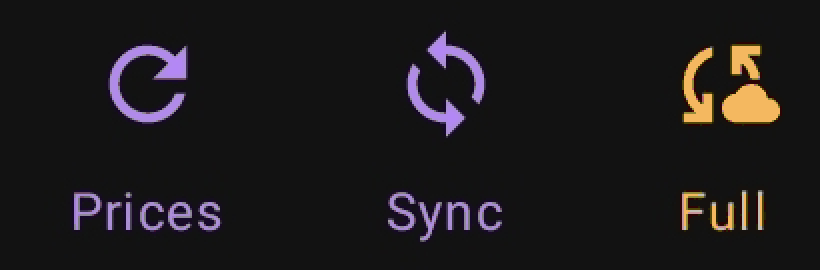
Prices updates just prices (fast, free). Sync refreshes exchange & wallet balances, including EVM wallets when you've added your own free Alchemy key (free). Full is a deep sync of every wallet — DeFi positions and tokens — and is the only one that can use credits. Buying credit is what unlocks that detailed EVM wallet data, DeFi positions included.
How is the 24h change % calculated?
It's the 24-hour market move of your current holdings — value-weighted, so bigger positions count more. For each asset we take today's value and its 24h price change to work out what that same amount was worth 24h ago, then compare the totals. It answers "how is my current portfolio doing today", the same way most trackers show it. Two things to note: it assumes you held today's holdings for the full 24h, so a coin you just bought is included as if you'd held it; and it's a market indicator, not your personal profit since you bought (that would need cost-basis and deposit tracking, which the app doesn't keep). Assets with no price move (cash, manual entries) don't affect it.
Why does my Full Sync button change color?
Its color reflects your credit status. Gold means nothing is set to spend credit yet, which is a healthy default. Green means your credit is healthy. Red means your balance is running low and Full Sync is about to fall back to the free sync — add credit before that happens. Gray means the balance hit zero, so the paid part (EVM tokens & DeFi coverage, plus any connected brokerages) is paused until you top up; everything else keeps working for free. Add credit from the Account screen. See the cost table in How it works.
What do I get by signing in?
Signing in is optional and unlocks: an optional cloud copy (your portfolio survives a reinstall or a new phone; stored readable by your account, with exchange and brokerage keys only in a passphrase-encrypted block), web access to your portfolio at foliosum.app (needs the cloud copy), brokerage connections, automatic backups after you make changes, and Full Sync (EVM wallets & DeFi, paid from your account credit).
I reinstalled and my exchange keys are gone
Your portfolio, manual holdings and last-known balances come back automatically when you sign in — but exchange and brokerage API secrets don't, by design. They live only in a passphrase-encrypted block of your cloud copy, which we can't read. On a fresh install the app offers to restore them: enter your backup passphrase and the keys return. Don't remember the passphrase? No problem — your data is already back; just re-enter each exchange's or brokerage's API key and live sync resumes. (Wallet addresses are public, so those always come back.)
What happens to my data when I sign out?
Sign-out clears this device down to an empty portfolio so nothing lingers. If your cloud copy is on, your data is already in your account and comes back when you sign in again on any device; if it is off, nothing was uploaded, so export a file backup first if you want to keep this device's data.
I added holdings before signing in — where do they go?
If you sign in to a brand-new (empty) account, your local holdings move into it automatically. If the account already has its own data, FolioSum asks which to keep — use the account's data (discard this device's), or cancel and stay signed out. Nothing is deleted without you choosing. Demo data never counts here and is never backed up — it's re-loadable any time.
How do I add a stock from a non-US exchange?
Define the market once under Settings → Market types (name, Yahoo suffix, currency), then add the stock with its plain ticker — the app appends the suffix and converts the local price for you. Full walkthrough with a German example in the Setup guide.
Setting something up for the first time? The Setup guide has step-by-step instructions for every exchange, wallet chain and optional API key.